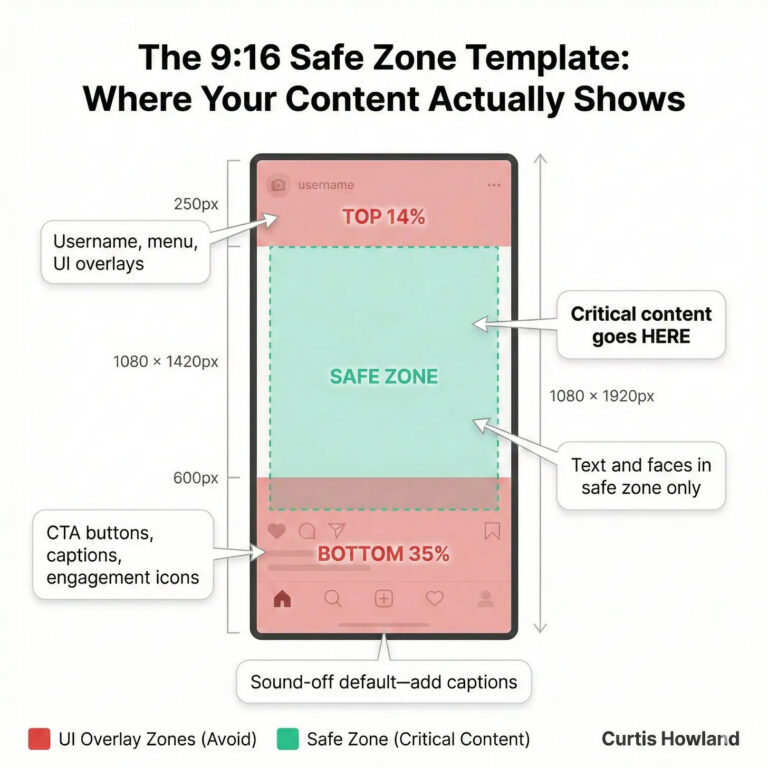
What are the recommended Meta Safe Zones in 2026?
For vertical Facebook and Instagram Reels adverts, Meta recommends leaving approximately:
14%
Top of advert
35%
Bottom of advert
6%
Each side
These margins are design recommendations for Reels, not compulsory upload requirements. Using them for Stories as well is a cautious approach, although individual placement guidance can differ.
For a standard 1080 × 1920-pixel vertical advert, this means keeping the most important information away from approximately the top 269 pixels, bottom 672 pixels and 65 pixels on either side.
That might sound like a lot of unused space, but remember, your background image or video can still fill the entire screen. It’s only your important text, logos and other key information that need to stay within the safer area.
You can find more information in Meta’s official Reels advertising guidance
What about Facebook and Instagram Feed adverts?
Feed adverts are slightly different.
Unlike Stories and Reels, Feed adverts don’t have one universal set of published safe-zone measurements.
However, that doesn’t mean there aren’t things to watch out for.
Depending on the placement, Meta may crop the artwork, change its presentation or position buttons and other information around it.
That’s why we’d generally recommend creating separate versions of your artwork for different placements.
| Placement | Recommended image size |
| Facebook & Instagram Feed | 1080 × 1350 (4:5) |
| Stories & Reels | 1080 × 1920 (9:16) |
| Square & carousel creative | 1080 × 1080 (1:1) |
These are useful starting points, but the correct dimensions alone don’t guarantee that everything will display perfectly.
Five ways to stop important information being covered
- Keep text away from the edges
Avoid placing headlines, prices, logos or other important information right at the top or bottom of your advert.
A little extra space around these elements can make a big difference, particularly on Stories and Reels.
- Design for different placements
One design doesn’t always work everywhere.
An image created for the Facebook Feed might look brilliant there but become awkwardly cropped when displayed as an Instagram Story.
Creating dedicated Feed, Story and Reel versions gives you more control over how your ads appear.
- Keep your messaging simple
Trying to squeeze too much information onto an image makes it harder to read, particularly on mobile devices.
Focus on one clear message and let the accompanying ad text or landing page provide the additional detail.
- Preview your ads before publishing
Meta Ads Manager allows advertisers to preview how their adverts will appear across different placements.
Take a moment to check the versions for Facebook Feed, Instagram Feed, Stories and Reels.
Look for any important details being cropped, hidden behind buttons or positioned too close to the edges.
Where available, use Meta’s safe-zone preview tools to identify potential problems.
- Check how your ads look once they’re live
Even after checking previews, it’s worth reviewing how your adverts appear on actual devices.
Meta’s interface can vary depending on the placement, device and format, so checking the live experience can reveal issues that weren’t obvious during the design stage.
Can you remove Meta’s buttons and overlays?
Unfortunately, not entirely.
Advertisers generally can’t remove the standard Facebook and Instagram interface elements that Meta displays around or over their adverts.
However, you can make sure your artwork takes these elements into account.
If necessary, you can also customise the creative for particular placements or choose not to use placements where the advert doesn’t display effectively.
The important thing is not to assume that because an advert looks good in your design software, it will look exactly the same when someone sees it on Facebook or Instagram.
How Net Visibility can help
At Net Visibility, we manage Facebook and Instagram advertising for businesses across a range of industries.
We know that successful advertising isn’t just about choosing the right audience or setting the right budget. The way your ads look and how they’re displayed matters too.
That’s why we consider the different placements when reviewing ad creative, helping ensure your messaging is clear and your adverts are presented as effectively as possible.
If you’re finding that your Facebook or Instagram adverts aren’t displaying properly, or you’re simply not getting the results you’d hoped for, we’d be happy to take a look.
Fancy a chat?
Get in touch with Net Visibility
and let’s see how we can help you get more from your Meta advertising.